Omnilap is in public beta, for iRacing on Windows
What Omnilap does.
A desktop telemetry app that reads the files the sim already writes. This is the whole of it, from the first lap you open to the team you share it with.
Telemetry analysis.
Every lap you drive, opened up channel by channel, with the time gained and lost drawn over it.
Laps lined up by distance
Two laps share one distance axis, so a corner is in the same place on both traces, with the time delta on top.
A workspace for every kind of question
Main, Pedals, Roll/Pitch and Video tabs for every lap, and Tires, Dampers, FFB and PC tabs on your own event laps. Sector and turn strips and a shared cursor run through all of them.
Sector and turn timing
Sector and turn times against the comparison lap, plus your five biggest time opportunities.
Racing line and pedal maps
Both lines on the track map, the distance between them, and a map of where you coast, how hard you brake and where you reach full throttle.
- Pedal analysis Coasting and pedal overlap, plus estimated wheel lock per tire, lock time and ABS time on your own event laps.
- Channels Speed, throttle, brake with ABS, gear, RPM, steering, g-forces, pitch, roll, FFB torque, wheel speeds, tire pressures and temperatures, and shock velocities.
- Damper histograms Velocity histograms for all four corners, for one lap.
- PC performance Frame rate, CPU and GPU beside the driving data.
Comparison laps.
A lap only means something next to a better one, so that one is always close by.
Compare against any lap in the same car at the same track
Laps from the event, ghost laps or a Garage 61 CSV export, one at a time.
A comparison lap for race week
Set a target lap for a race week and car, and that race's events use it automatically.
- Remembered comparison Kept per event, and carried over from your last event with the same car and track.
Lap video.
The numbers say where; the video shows what.
Record laps from replays
Video comes from iRacing replay files. With a saved replay loaded in iRacing, Omnilap plays the lap and records it once per camera, cockpit and chase.
Video tied to telemetry
Video follows the chart cursor by distance.
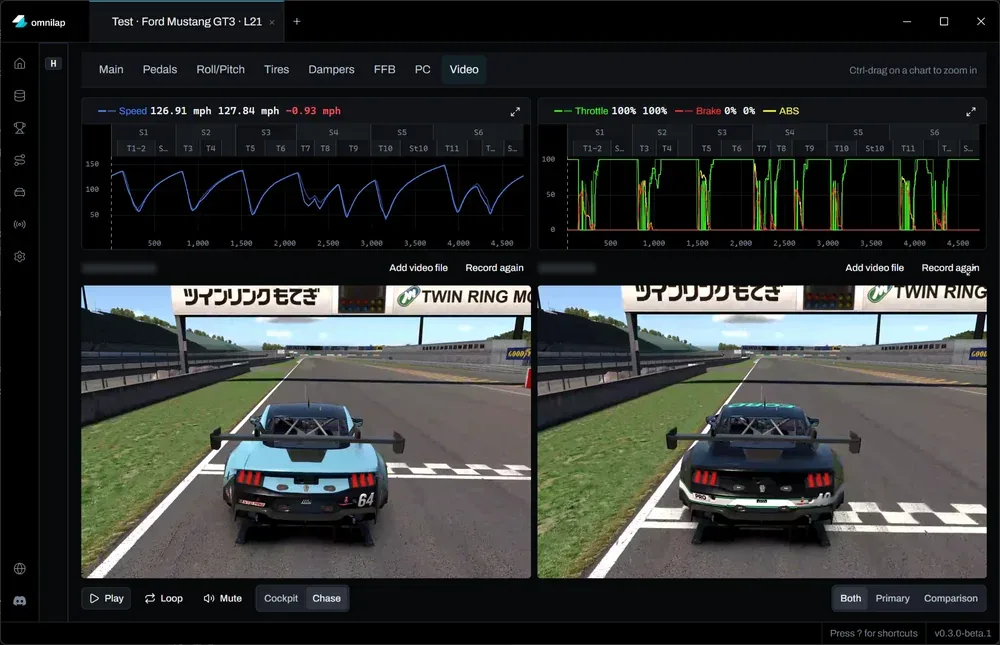
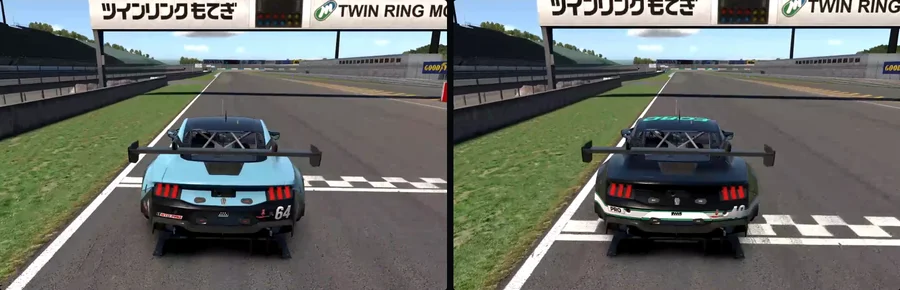
- Ghost laps Video for best ghost laps, from the session's iRacing replay.
- Side by side Next to the comparison's video, when the comparison is a lap that has one.
- Your own footage Add a video of your own and pin it to a moment you recognise.
The Data Book.
Everything the sim writes, sorted into the sessions it came from.
Automatic import
Omnilap finds your iRacing folder, and new telemetry imports by itself while the app is open.
Everything organised into events
Events, Ghost Laps, Garage 61 and Replays tabs, with filters on series, track, car and driver. Bookmark and tag your laps.
Event breakdown
Every lap by stint for all drivers, with results. Your own stints add fuel burn, temperatures and tires at the end of the stint.
- Replay catalogue Saved replays with track, car and drivers, linked to the matching event.
- Smaller telemetry files Shrink them when you ask, and restore them exactly as they were.
- iRacing settings check Spots telemetry recording switched off and turns it on, with a backup.
Ghost laps.
Your best laps stay yours, even after you beat them.
Ghost archive
iRacing overwrites your ghost lap when you beat it. Omnilap keeps a frozen copy tied to the event.
Back into iRacing
One click puts an archived ghost back in iRacing, without replacing anything.
Pit Wall.
Live timing from the running sim, so iRacing has to be open on your Windows PC.
Live timing
Standings, relative, track map, lap-time and delta charts and per-car stint timelines.
Session feed
Position changes, pit stops, flags, your incidents and weather as they happen.
Record and replay a session
Press r to capture it and replay it later as a timing screen. A single-session capture imports as an event.
Race week.
What's on, where you're racing next, and a lap worth chasing.
- Series board Race timeline by series, a season view, and bookmarks for series and cars.
- Recommended laps Up to three hand-picked Garage 61 laps per series, week and car, linking out to Garage 61. Browse the laps
- Tracks and cars Catalogues with specs and the series running each this season. Tracks also show your laps and best lap per layout.
Sync and teams.
Optional, and they need an account. Everything else on this page works without one.
Cloud sync
Off until you turn it on. Events, ghost laps and setups by default, with telemetry, replays and video optional for your own laps. Large uploads pause while iRacing runs.
Teams
Create a team, invite by email or link, and manage roles.
Choose what each audience sees
Synced events start out shared with anyone signed in to Omnilap and with your teams. Change it for each kind of data: ghost laps, telemetry and setups for either audience, while replays and videos are team-only.
- Events in the browser Results, laps, sectors and fuel at app.omnilap.com.
- Teammates' files Pull a teammate's shared event into the desktop app, with their ghost laps, telemetry, video and replays.
- One-off upload Upload a single event without turning sync on, and share it by link.
How it's built.
A Windows desktop app for iRacing, made to be driven from the keyboard.
- No account needed Your library stays on your computer unless you sync it.
- Keyboard first A command palette, a list of shortcuts and keys for getting around.
- Tabs and windows Browser-style tabs and multiple windows.
- Your units Unit preferences in Settings.
Omnilap is in public beta.
It runs on Windows, and anyone can download it. You don't have to join the Discord, but we strongly recommend it: the Discord is where the beta is run.